

Blog Posts
The 12-Color High-Definition Gamut: Beyond CMYK
Why 12-color giclée printing makes art look so much better.
 Apr 22, 20266 min read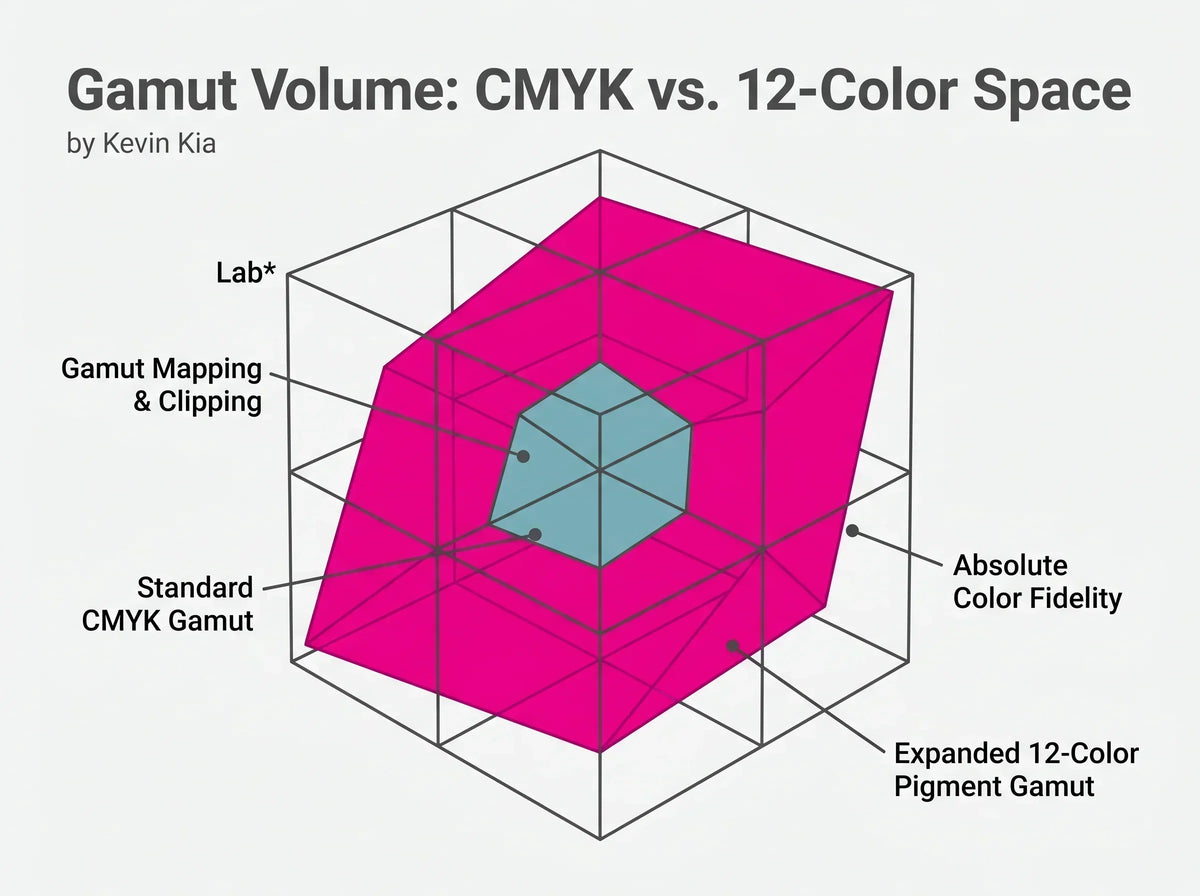
On this page
When you look at a vibrant coastal sunset or the subtle, layered greens of a dense forest, your eyes process millions of distinct colors. Translating that richness onto paper without losing its character is one of the central challenges of fine-art printing.
Standard commercial printing commonly relies on CMYK—Cyan, Magenta, Yellow, and Black. That four-color process is effective for everyday printed materials, but it has a more limited color gamut than a multi-channel fine-art pigment system. Highly saturated colors can be compressed, delicate shadows can shift, and smooth gradients can show visible banding.
The key idea: a printer can only reproduce colors that its physical ink system and workflow can reach. When a source color falls outside that reproducible range, it must be mapped to a printable substitute.
Art Academi uses a 12-color giclée approach for its fine-art print workflow. More pigment channels can provide a wider reproducible range and more control over delicate color transitions, particularly in large-format work.
Key Takeaways
- CMYK is limited: A four-color process cannot reproduce every saturated color visible on a screen.
- More channels expand the palette: Additional pigment channels provide more physical color choices.
- Smoother transitions matter: Fine-art workflows are designed to preserve subtle gradients and neutral shadows.
- Large prints reveal flaws: Color shifts, weak gradients, and muddy shadows become easier to notice at large sizes.

What Is a Color Gamut?
In printing, a color gamut is the range of colors a particular device, ink set, paper, and workflow can reproduce. A color that exists in an RGB image may fall outside the printable gamut of a particular CMYK process. The workflow then uses gamut mapping to substitute a reproducible color.

This is one reason a print can look different from the image on a backlit display. Screens generate light, while prints reflect light from a physical surface. The available ink gamut and paper characteristics therefore influence the final appearance.
Interactive Uploader: Test Your Own Image
Upload any image below to compare a simulated CMYK-style result with a richer 12-color giclée interpretation. This browser-only preview keeps the selected image on your device.
Interactive preview unavailable in the Journal article body: the original custom JavaScript uploader has been removed so the article body contains no inline scripts or custom inline styling. The Journal template can own the presentation safely.
CMYK vs. 12-Color Giclée Printing
| Feature | Standard CMYK | 12-Color Giclée |
|---|---|---|
| Color range | More limited | Wider potential gamut |
| Gradients | May show banding depending on workflow | Designed for smoother tonal transitions |
| Neutral shadows | Can be sensitive to channel balance | Additional channels can improve tonal control |
| Typical use | Commercial print applications | Fine-art and photographic reproduction |
How Color Accuracy Is Measured
Delta E is a family of color-difference measurements used to describe the difference between a target color and a measured color. It is useful for understanding color accuracy, but a single metric does not replace the complete print workflow: source file, color management, printer, ink, paper, viewing conditions, and measurement method all matter.

The Secret to Smooth Gradients
Banding occurs when a smooth tonal transition breaks into visible steps or stripes. It can be influenced by source-file bit depth, image processing, color conversion, printer resolution, dithering, ink behavior, and the limits of the output process.

For large-format artwork, subtle skies, mist, water, and deep shadows make these transitions particularly important. High-resolution source files and a capable pigment-printing workflow work together to preserve them.
Why Extra Inks Matter
The benefit of a multi-channel system is not simply “more ink.” Different channels can provide more control over specific areas of the color and tonal range.

- Dedicated grey channels: Additional neutral inks can help maintain balanced grey and shadow reproduction.
- Expanded color channels: Additional hues can help reproduce saturated reds, magentas, blues, and other colors that may be compressed in a smaller gamut.
- Black channels: Different black inks and paper-specific workflows can support deeper, more controlled shadows.
- Light channels: Additional lighter inks can support smoother transitions in delicate tones.

How to Spot a High-Quality Print
You do not need a laboratory to notice common print-quality problems. Look at the areas where the workflow is most demanding:
- Shadows: Are they neutral and detailed, or muddy and tinted?
- Gradients: Do skies and sunsets transition smoothly?
- Bright colors: Do saturated hues retain their intended character?
- Overall presence: Does the print preserve the depth and atmosphere of the source image?
Color and Your Room's Mood
Color accuracy matters because color contributes directly to how artwork is perceived in a room. Large wall art makes this especially noticeable: subtle shifts in sky, foliage, skin tones, neutrals, or shadows can change the overall impression of the piece.

Common Printing Mistakes
- Assuming all printers reproduce the same color: Ink sets, papers, profiles, and workflows differ.
- Ignoring gamut limitations: Saturated source colors may require perceptual or relative color mapping.
- Ignoring banding: Visible steps in skies and shadows can indicate limitations in the file or output workflow.
- Choosing output without considering scale: Large prints make color and tonal problems easier to see.
- Forgetting the paper: The surface affects color, density, texture, and the final viewing experience.
Frequently Asked Questions
What does CMYK stand for?
CMYK stands for Cyan, Magenta, Yellow, and Key (black). It is a standard four-channel printing process used across many commercial applications.
Why can 12-color printing be useful for art?
A multi-channel pigment system can provide a wider reproducible gamut and more control over subtle colors and neutral tones than a basic four-channel process.
What is color banding in printing?
Banding is the visible stepping of a gradient instead of a smooth tonal transition. It can arise from limitations in the source file, processing, color conversion, or output workflow.
Why can prints look different from a screen?
A screen emits light while a print reflects light, and each has different color-gamut and viewing characteristics. The print workflow therefore cannot reproduce every displayed RGB color identically.
Final Thoughts
A fine-art print is the result of an entire color workflow, not just a file sent to a printer. A wider multi-channel pigment system can provide more room to reproduce saturated colors, neutral shadows, and subtle gradients, while the source file, color management, paper, and viewing conditions remain equally important.

If you want to explore Art Academi's fine-art print collection, you can continue to the best-selling fine-art prints.
Selected Technical References
- R. W. G. Hunt, The Reproduction of Colour, Wiley.
- G. J. Sharma, Digital Color Management, CRC Press.
- X-Rite, technical guidance on Delta E and color measurement.

Art worth living with


